
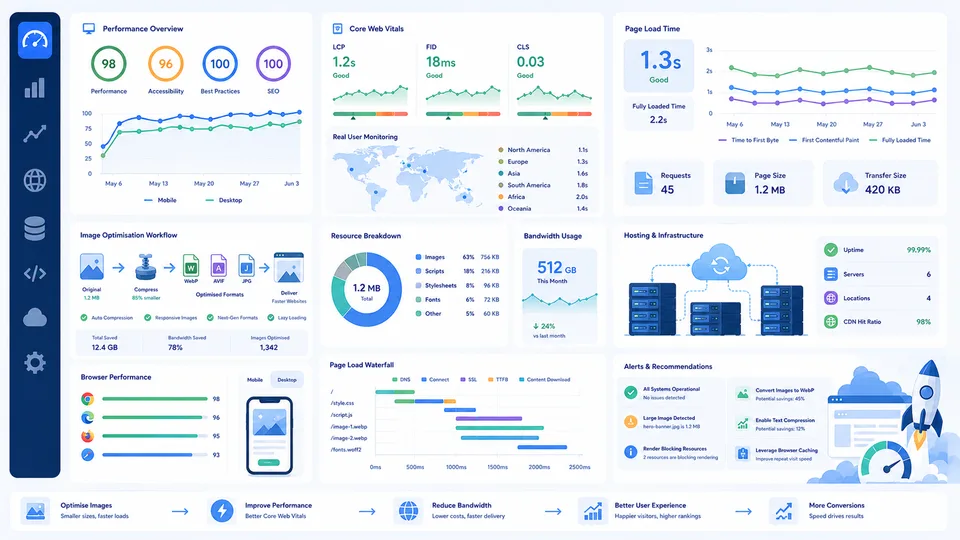
Website Performance Usually Gets Worse Gradually
I've found that website performance problems are almost always incremental — a site rarely becomes slow overnight, and the fixes are usually more straightforward than they first appear. Most websites do not suddenly become slow overnight. Performance problems usually build slowly in the background.
A few larger images get uploaded. A plugin adds extra scripts. Fonts multiply. Tracking tools expand. Videos autoplay. Pages become visually heavier. None of these decisions seem catastrophic individually, but over time the site becomes noticeably slower and more expensive to run.
I’ve noticed this especially on projects that started small and grew quickly. Early versions often feel fast almost by accident because there simply is not much content yet. Then the site matures, more features get added and performance starts slipping without anyone really noticing until metrics or user behaviour begin changing.
Website performance is partly technical, but it is also operational. It reflects how carefully a site evolves over time.
Loading Speed Is Not Just About Impatience
People often reduce website speed discussions to attention spans or impatience, but slow performance affects much more than that.
Loading speed influences:
- search visibility
- bounce rates
- mobile usability
- conversion rates
- bandwidth costs
- hosting requirements
- crawl efficiency
- overall user trust
A slow website subtly changes how users interact with everything else on the page. Navigation feels less responsive. Content feels heavier. Even good design can start feeling awkward if the experience itself feels delayed.
This becomes especially noticeable on mobile networks where bandwidth limitations and latency are more obvious.
Images Are Usually The Biggest Performance Problem
On many websites, images quietly become the largest source of unnecessary weight.
Large hero banners, oversized screenshots, poorly compressed PNG files and unoptimised uploads can dramatically increase page size without adding meaningful value to the user experience.
One thing that surprises many people is how little visual difference there often is between a carefully optimised image and a much larger original version. File sizes can sometimes be reduced massively without noticeably hurting quality in normal browsing conditions.
The problem is that websites rarely contain just one image.
A homepage might contain:
- hero graphics
- article thumbnails
- logos
- icons
- background illustrations
- embedded screenshots
When multiplied across thousands or millions of page views, image optimisation starts affecting both speed and infrastructure costs quite significantly.
Related article:
Optimising Images For The Web: File Sizes, Formats & Loading Speed
File Sizes Affect More Than Storage
File size discussions are often treated as purely technical concerns, but they directly affect real-world usability.
Larger assets increase:
- download times
- bandwidth usage
- hosting costs
- mobile data usage
- cache pressure
- rendering delays
This becomes especially important for media-heavy sites, educational platforms, ecommerce stores and modern editorial websites that rely heavily on visuals.
I remember comparing two versions of the same article page once where the visual design barely changed, yet the optimised version felt dramatically more responsive simply because the assets were lighter.
Supporting articles:
Modern Websites Often Load Far More Than People Realise
When people think about page speed, they often picture a simple HTML page loading from a server. Modern websites are much more complicated than that.
A single page may involve:
- JavaScript bundles
- tracking scripts
- analytics platforms
- advertising systems
- third-party fonts
- CDN requests
- API calls
- dynamic rendering
- image optimisation pipelines
- background requests
This complexity is partly why performance optimisation can feel frustrating. The problem is rarely one single issue. It is usually the combined effect of many small inefficiencies interacting together.
Core Web Vitals Matter, But Context Matters Too
Performance discussions increasingly revolve around Core Web Vitals and other measurable metrics. These are useful because they create consistency and make optimisation easier to prioritise.
But metrics alone do not always capture the full experience.
A technically “passing” site can still feel awkward or sluggish in practice, especially on weaker devices or slower mobile networks. Likewise, a visually rich site may slightly underperform on some benchmarks while still feeling pleasant and usable for real users.
The goal is not to obsess over perfect scores. The goal is to create websites that feel efficient, responsive and trustworthy under realistic conditions.
Bandwidth Costs Scale Quietly
One of the less obvious performance problems is cumulative bandwidth usage.
At low traffic levels, serving heavier assets often feels inexpensive. But traffic multiplies everything.
A page that transfers:
- 2MB
- 5MB
- 10MB
may not seem dramatically different during local testing, yet the infrastructure implications can become substantial at scale.
This is especially true for:
- high-traffic blogs
- media sites
- AI-generated image platforms
- video-heavy pages
- documentation systems
- education platforms
Related reading:
Hosting Alone Does Not Fix Poor Optimisation
A common assumption is that performance problems can simply be solved by upgrading hosting.
Better infrastructure certainly helps, but inefficient websites often remain inefficient regardless of hardware.
Poorly optimised frontend assets, excessive scripts and unnecessary processing still create bottlenecks even on powerful systems.
In practice, optimisation usually works best when:
- assets are lighter
- requests are reduced
- caching improves
- scripts are controlled carefully
- rendering is simplified
- media delivery is optimised
Stronger hosting then becomes a multiplier rather than a bandage.
Storage, CDN And Caching Decisions Matter Long-Term
Performance is not just about initial page load speed. Long-term infrastructure design matters too.
Caching systems, CDNs and storage architecture influence:
- repeat visit speed
- global delivery consistency
- bandwidth efficiency
- server load
- cost scalability
One thing many smaller projects underestimate is how quickly media libraries grow over several years. Screenshots, uploads, article images and generated assets quietly accumulate until storage and delivery systems become meaningful operational concerns.
Related article:
How Much Cloud Storage Do You Actually Need?
Useful Calculators For Website Performance Planning
Performance optimisation becomes easier when websites are measured realistically instead of relying on guesswork.
- File Size Calculator
- Download Time Calculator
- Internet Speed Calculator
- Data Storage Converter
- Bandwidth Calculator
- Server Cost Calculator
These tools help translate abstract optimisation discussions into more practical infrastructure decisions.
Good Performance Often Feels Invisible
One interesting thing about website performance is that users rarely praise it directly. Fast, responsive websites simply feel natural and trustworthy.
People usually only notice performance once it becomes frustrating.
That is partly why optimisation work sometimes gets neglected. The benefits are often subtle:
- smoother navigation
- lower bounce rates
- better crawl efficiency
- reduced hosting pressure
- improved mobile usability
- stronger overall experience
Over time though, those small improvements compound quite significantly.
Where To Start
If you are trying to improve website performance, begin with the largest problems first rather than chasing tiny benchmark improvements.
Usually that means looking closely at:
- image sizes
- JavaScript weight
- third-party scripts
- page size growth
- bandwidth-heavy assets
- caching strategy
- mobile performance
A lot of websites do not need extreme optimisation. They simply need more deliberate decisions about what is actually necessary.
The supporting articles and calculators throughout this guide are designed to help make those trade-offs easier to understand in practical real-world terms instead of reducing performance to abstract technical jargon.