
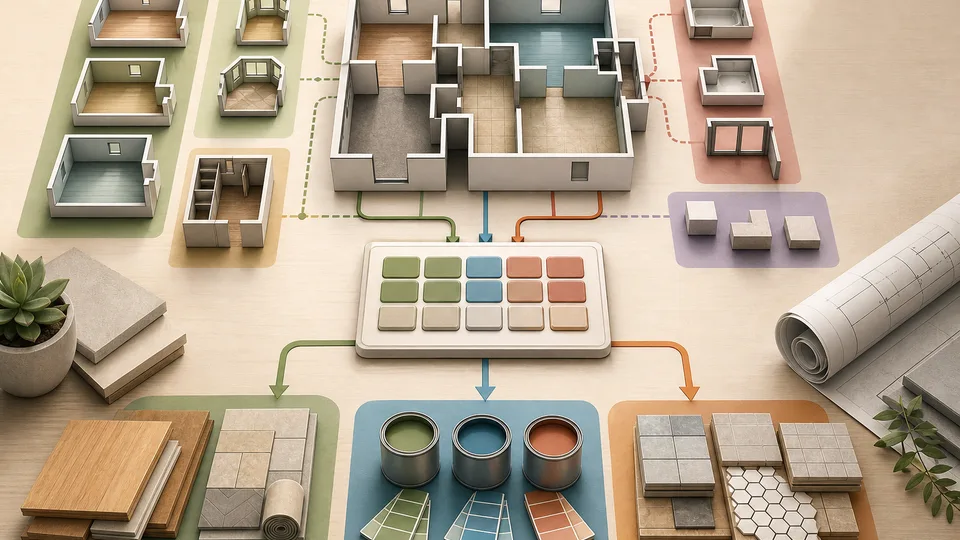
A single room is easy enough to measure badly. A whole renovation project is easier to mismeasure because the errors hide inside the total. One bedroom is straightforward, then there is an alcove. The hallway has a cupboard. The living room has a fireplace base. The kitchen has units you may not want counted for flooring. By the time every space is added together, the number can look precise while still being built from guesses.
That is why I prefer measuring multi-room projects as a list of small areas rather than one big rectangle. Each room gets its own line. Each awkward space gets added or subtracted deliberately. Waste allowance is applied only after the net area makes sense. It is slower than guessing, but it gives you a total you can explain when you order flooring, plan paint, compare quotes, or check a renovation budget.
The Multi-Room Area Calculator is built for that kind of project. It lets you add rooms, alcoves, closets, exclusions, and waste allowance, then review the room-by-room total. If you only need one plain rectangle, the Square Footage Calculator is simpler. This guide explains when the multi-room approach is worth the extra care.
Why one total is not enough
A whole-floor estimate often starts with a rough thought: the downstairs is about this wide and this long, so the total must be roughly that. That can be useful for a first conversation, but it is risky when the number will drive material orders.
Rooms are rarely perfect blocks. Older homes can have walls that are not square. Extensions create returns and odd corners. Built-in cupboards, fireplaces, islands, stair openings, bay windows, and alcoves all change the usable project area. A single total does not show where those decisions came from.
A room-by-room breakdown also makes checking easier. If the final number feels high, you can inspect the living room, hallway, bedroom, or kitchen line instead of trying to debug one large figure. That matters when another person, supplier, or contractor needs to understand your assumptions.
Start with the main rectangles
For each room, measure the main length and width at floor level. Use the largest practical dimensions if the walls are slightly uneven. Write the room name beside the measurement, even if the calculator only needs numbers, because the note helps later when you compare the estimate with a quote or order.
Do not try to solve every awkward part at once. First capture the main rectangle for each room: bedroom, landing, hallway, living room, dining space, kitchen, utility, study, or whatever spaces belong to the project. The goal is to create a base area that is easy to understand.
If the room is L-shaped, either split it into two room lines or enter the main rectangle and add the missing section as an adjustment. The important thing is consistency. If you split one L-shaped room into two rectangles, name the parts clearly so the calculation still makes sense when you return to it.
Add alcoves, closets, and small extensions separately
Alcoves and closets are easy to miss because they feel small. In a single room, that may not matter much. Across a whole project, several small areas can become enough to change a material order.
Use additions for floor area that is not captured by the main rectangle. A bay window recess, cupboard floor, wardrobe alcove, under-stair section, or small side return may all belong in the project if the material continues into that space.
Separate additions also help with decisions. You might include a closet for carpet but exclude it for a different flooring material. You might include a bay window for paintable wall area but handle the floor area differently. Keeping the adjustment visible lets you change the assumption without rebuilding the whole estimate.
Subtract areas that should not count
Subtractions are just as important as additions. Permanent kitchen units, a fireplace hearth, a stair opening, a fixed island, a shower tray, or a built-in cabinet may reduce the material area for a specific job.
Do not subtract something just because it is occupied by furniture. A sofa, bed, table, or movable cabinet usually sits on top of flooring and should not reduce the floor area. Subtract only areas that are genuinely not part of the material surface you are estimating.
This is where the project type matters. A floor covering estimate, wall-paint estimate, tile estimate, and material take-off can count different surfaces. For flooring, the floor under a radiator may still count. For paint, doors and windows are usually subtracted from wall area. For tile, a vanity unit or bath panel may change the surface being covered.
Apply waste after the net area
Waste allowance belongs after the measured project area, not before the room breakdown. First work out what should count. Then add the extra percentage for cuts, fitting, breakage, pattern matching, or spare material.
For simple straight-laid flooring, a modest waste allowance may be enough. For tile, diagonal layouts, patterned materials, awkward rooms, or many small cuts, the allowance may need to be higher. The calculator lets you apply a waste percentage, but the reason for that percentage should come from the material and layout.
If the area feeds a material order, cross-check with the relevant tool. Use the Flooring Calculator for pack coverage, the Tile Calculator for tile count and waste, and the Paint Calculator when wall area, doors, windows, and coats are the real issue.
Keep measurement notes with the estimate
A useful area estimate is not just a number. It is a small record of what you measured and why. Keep notes such as “living room main rectangle”, “bay window added”, “fireplace base subtracted”, “closet included”, or “kitchen units excluded for flooring”.
Those notes protect you from double-counting later. They also make conversations easier. If a supplier asks why your area differs from a quote, you can compare assumptions instead of arguing about whose total is right.
For bigger renovation budgets, area is only one input. The Material Take-Off Calculator can help when the project moves from area measurement into broader material planning, but the take-off is only as good as the measured areas behind it.
Where this calculator should not be used
The multi-room calculator is a project planning tool. It is not a legal floor-area standard, survey, appraisal, property listing method, building-control measurement, or lease measurement. If the number affects a formal property record, valuation, tenancy agreement, planning submission, or dispute, use the required standard and a qualified professional.
It also does not read floorplans or photos. You still need to measure, sketch, and decide what counts. The calculator helps organise the arithmetic, not replace judgement about the project.
A simple worked example
Imagine a flooring project with three spaces. The living room is 4.8m by 3.6m, the hallway is 3.2m by 1.1m, and the bedroom is 3.9m by 3.2m. The living room also has a 0.8m by 0.6m bay area to add, while a 0.5m by 0.4m hearth is excluded.
The main room areas are 17.28m², 3.52m², and 12.48m². The bay adds 0.48m² and the hearth subtracts 0.20m², giving a net project area of 33.56m². With a 10% waste allowance, the adjusted order area becomes about 36.92m².
That final number is useful because it is traceable. If the flooring pack coverage is 2.2m² per pack, you can move from measured area to pack count. If a contractor measures 35m² before waste, you can compare room lines and adjustments instead of guessing why the totals differ.
The practical habit
Measure multi-room projects as a set of visible decisions: room, add, subtract, waste, then material order. That habit keeps the estimate honest. It makes small spaces visible, stops exclusions being forgotten, and gives you a better chance of ordering enough material without buying wildly too much.
Use the Multi-Room Area Calculator when the project spans several spaces or awkward adjustments. Use a simpler square-footage calculation when the job really is one clean shape. The right tool is the one that matches the messiness of the space you are actually measuring.